Table of contents
Open Table of contents
Introduction
Have you ever left a website and, upon returning, found yourself lost, unable to remember which section you were in or what content you were viewing? This frustrating experience is more common than we think, and as Drupal developers, we have the power to fix it.
In the Drupal ecosystem, although there are tracking and analytics modules, many are overly complex for specific needs, depend on third-party services, or do not offer the flexibility we need to integrate the “last page visited” data directly into our business logic.
When would you use this module?
-
E-commerce: Display “continue shopping” or remember the last category visited
-
Online courses: Allow students to pick up exactly where they left off in the lesson
-
Forums/communities: Take users back to the thread they were reading
-
Content sites: Suggest “continue reading” after interruptions
-
Internal applications: Maintain work context between sessions
-
Behavior analysis: Understanding drop-off points without Google Analytics
The solution: A lightweight custom module that integrates natively with Drupal, without external dependencies, and that we can tailor exactly to our needs. Let’s create it!
Step 1: Generating the Module Structure with Drush
We start by using Drush, the essential CLI tool for any Drupal developer. If you don’t have Drush installed, you can do so with:
composer require drush/drush1.1 Generating the module skeleton
We execute the following command from the root of our Drupal project:
drush generate module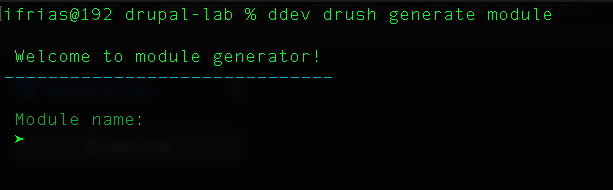
1.2 Completing the basic configuration
Drush will guide us with interactive questions:
 Module name:
 ➤ Last Page Tracker

 Module machine name [last_page_tracker]:
 ➤ last_page_tracker

 Module description:
 ➤ Tracks and stores the last page visited by each user.

 Package [Custom]:
 ➤ Custom

 Dependencies (comma separated):
 ➤

 Would you like to create module file? [No]:
 ➤ Yes

 Would you like to create install file? [No]:
 ➤ No

 Would you like to create README.md file? [No]:
 ➤ No
1.3 Generated structure
After completing the wizard, Drush will create the following structure:
modules/custom/last_page_tracker/
├── last_page_tracker.info.yml
└── last_page_tracker.module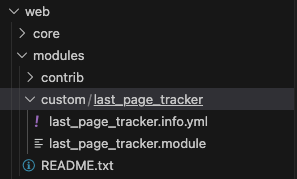
1.4 Checking the .info.yml file
Open last_page_tracker.info.yml to view the base configuration:
name: 'Last Page Tracker'
type: module
description: 'Tracks and stores the last page visited by each user.'
package: Custom
core_version_requirement: ^10 || ^11
1.5 Enabling the module
drush pm:enable last_page_trackerOr from the Drupal administrative interface:
- Navigate to
/admin/modules - Search for “Last Page Tracker” in the “Custom” section
- Check the box and click “Install”

✅ Congratulations! You have created the basis for your custom module. In the next step, we will begin to implement the tracking logic using Drupal hooks.
Important note: Make sure your module is in modules/custom/ and not directly in modules/, as Drupal ignores modules in the root of modules/ for security reasons.